EHS Software Implementation: What Each Phase Does to Your Records
A vendor's phase list names what gets delivered: workshops, configuration, migration, training. Each phase also decides something about your records: which facts a form can hold, which categories exist, which history survives migration. A deliverables list does not show that part, and it is the part you sign.

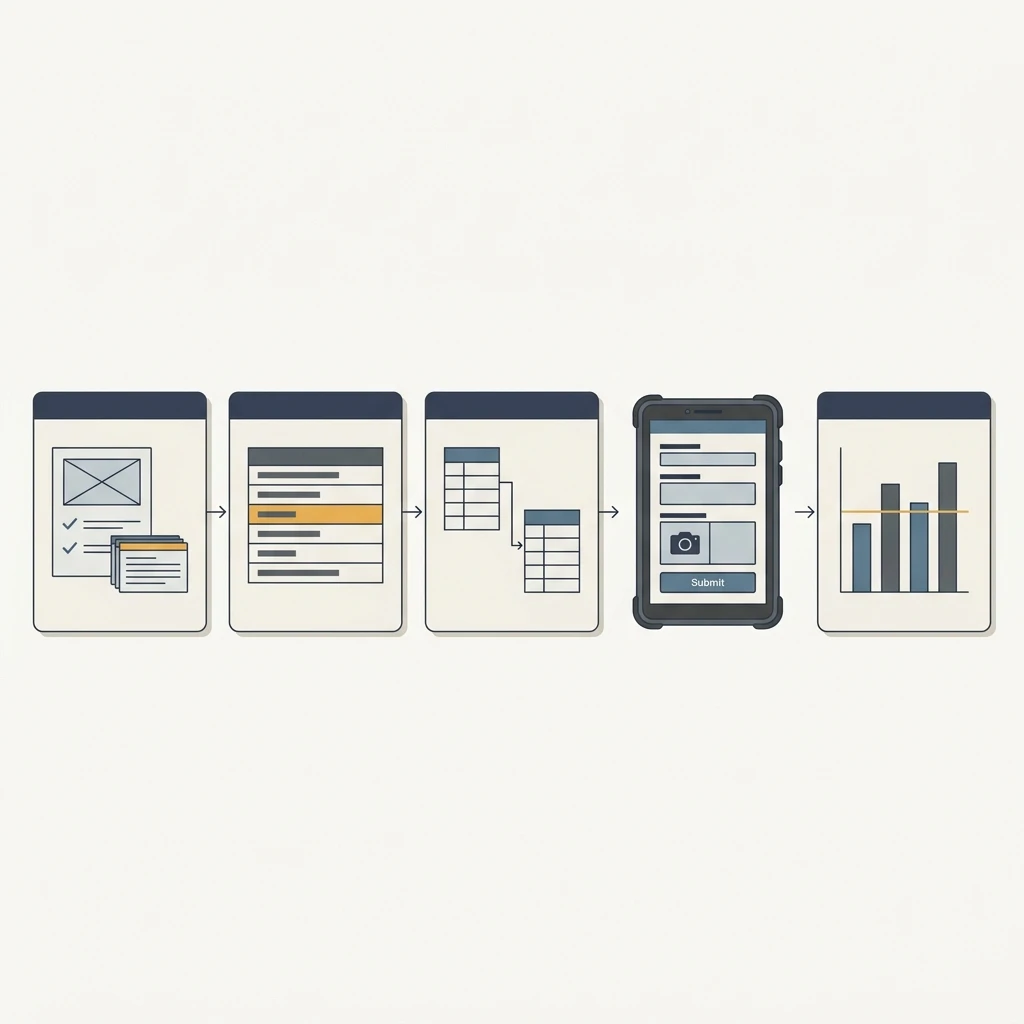
An EHS software implementation can be planned in five phases: discovery and requirements; design and configuration; data, testing and validation; training and go-live; and after go-live. Each phase sets something that subsequent work depends on: requirements, category lists, forms, and migration scope. Design and configuration carries the greatest weight, and its five layers must be configured in a fixed order.
A phase list says when each piece of work happens. It does not say what each phase decides about your records, or what has to happen before that decision is safe to sign. A category list approved line by line in a meeting can still fail the first time someone sorts real records with it. Below is each phase: what the plan lists, what the phase actually decides, and what to check before you sign. That check is the site test: real records or real work, checked by the people who produce them. The table of site tests for each configuration layer is further down.
What an EHS software implementation involves
Change management (training, communication and support for the people who will use the system) runs alongside all five phases.
1. Discovery and requirements
On the plan: the project charter, who makes which decisions on the project, vendor selection, the IT security review, and the written list of what the system must do.
What it decides: which facts a record can ever hold. The vendor estimates implementation hours and cost from the requirements. Any fact left out of that list sits outside the contract scope. It gets a field only if the ready-made template carries one or someone pays to add it. Adding it after go-live means reworking the forms, workflow rules and reports built without it, and every record filed before has it blank.
When requirements come out of workshops, they describe the work as the people in the room remember it. The forms and approvals they handle every week make it in. The job done once a year, the contractor crew and the rare event do not, unless someone brings records of them. Neither does the question an investigator asks after a serious incident: what happened in what order, under which conditions, with which equipment and which people. "Record incidents with a description" passes a workshop easily. It leaves the sequence of events in a free-text box that a keyword search can find but no report can count, until someone, or an AI model, reads every record.
Before you sign: take enough real records to cover every kind the system must hold, and confirm each one could be entered, sent to the right people and reported under the requirements as written. A process map cannot show that. Where incidents are in scope, include your most serious closed investigation. The EHS lead and the operations managers sign the requirements that decide what a record holds and where it goes; IT signs the security and integration requirements.
2. Design and configuration
On the plan: mapping how the work will be done in the new system, then setting the platform up to match: categories, forms, workflows, integrations and reports.
What it decides: your data model, meaning the category lists, the fields on each form, and how records link to each other, such as an incident to its corrective actions and the people involved. The workflow rules, reports and trends all read that structure. A plan that lists this phase as "configure the system" treats a design decision as a setup task.
When the platform arrives with its own categories and fields, the default stays wherever a workshop said nothing. That part of your data model is decided by whoever built the template for every customer at once, without knowing your sites. A form can also make the wrong category easier to pick than the right one: the first item in a long list, a default nobody changed. That is an error trap, not a setting.
Before you sign: the configuration goes in five layers, in a set order, and each layer has its own site test. Both are covered below, in What gets configured first and the table of site tests.
3. Data, testing and validation
On the plan: cleaning old records, followed by a test migration (a trial copy of your old records into a test system). User acceptance testing follows, where people chosen from the business work through written test scripts on the configured software. Finally, a pilot puts the system into real daily use at one or more sites. The test migration must finish before the reports layer can be configured, so this phase starts while design and configuration is still underway.
What it decides: what your history means. Every old category with no exact match in the new list has to go somewhere. Mapping it to "Other" or to the nearest new category distorts any historical comparison spanning go-live. Retiring the category prevents new entries but creates an abrupt step-change in your reporting. Re-reading and reclassifying each old record by hand preserves historical tracking, at the cost of manual labor. Cleaning makes the same kind of choice: a blank field filled with a default value looks like a recorded fact afterwards.
Migration also decides which details each record keeps. Details such as an event sequence written as free text, a site's own equipment tag numbers and witness lists get dropped, or pushed into a general notes field, when the new system has no field for them. A migration that moves each record only as it stands today also leaves behind whatever edit history the old system kept. That includes the severity first reported and who changed it, and the date a corrective action was reassigned.
User acceptance testing is not built to find these gaps. When its scripts are written from the requirements, it confirms the system does what the requirements say, not what they left out.
Before you sign: the person best placed to tell what was lost is whoever wrote the original record, such as the investigator on a closed investigation. Have them check a sample of their own records after the test migration. Where the author has left, use someone who works at the same site. The EHS lead signs off how old categories are mapped and what history comes across; IT signs off how it moves. Records left behind still fall under their legal retention periods, so decide where they will be kept and who can find them.
4. Training and go-live
On the plan: users learn the system, the final migration runs, and the go/no-go decision is made.
What it decides: whether the system meets the work, or the work has to bend to the system. Training can cover for a form that does not fit. If supervisors need a classroom session to find the right category, the list or the form is wrong, and every new starter and contractor crew needs the same session before their reports can be trusted.
The classroom is not where the form gets used. A hazard observation or inspection learned on a laptop at a desk gets filled in out at the job, in the PPE, light and phone signal found there.
The papers for the go/no-go meeting can be built from counts of open software faults and training attendance. Neither shows whether a supervisor can file a real report there on their own.
Before you sign: the project sponsor (the executive who owns the budget) and the EHS lead sign the go/no-go decision, with IT confirming the technical switchover. Before that meeting, have real reports filed without help in the configured system, alongside the old one, for a full normal shift at the first site with the hardest working conditions. A pilot at that site counts, if its users filed without help from the project team. If the configured system is still a test system, check it is cleared to hold personal data; incident reports carry names and injury details.
5. After go-live
On the plan: a short period of intensive support, a handover to long-term support, a post-implementation review, and reviews of adoption and benefits.
What it decides: whether the records stay true to the work. Adoption figures built from logins and records filed have a blind spot: a supervisor who picks "Other" for every report counts as an adopter.
Two warning signs show whether the system fits the work: the share of "Other" by site and by form, and a site whose reporting falls while its work carries on, even if its logins hold steady. A drop like that can mean the official system could not keep up with the work, or that reporting has become risky for the person reporting. A compliance reminder fixes neither. Ask the site whether its hazards are being written down somewhere else.
Before you accept the handover: category reviews, reviews of "Other" entries, configuration changes and the data dictionary (the record of what each field and category means) need a named EHS owner. Check both warning signs every month. A vendor can bill for support after go-live; deciding what your categories mean stays with you.
Already live? Run the category test on your first months of live records. The share of "Other" and a sample check of the records that did get a category show where the list failed.
What gets configured first
The system stacks in five layers, each reading fields that earlier layers set. The site structure (which sites, areas and departments exist) and the user roles come before all of them: every layer reads which site and which role a record belongs to. Work through the layers in this order:
- Categories and codes. Hazard categories, immediate cause codes, contributing factor codes, root cause categories used in investigations and corrective actions, audit finding types and every other pick list. Every report that breaks results down by type is built from these lists.
- Forms. The incident report, the hazard observation, the inspection checklists and every other form. Every category pick list on a form comes from layer 1.
- Workflows. Approvals, escalations, corrective-action triggers. A workflow rule reads what the form captured: "if severity is critical, notify the site director within four hours."
- Integrations. Links to other systems, such as HR, maintenance, training or business reporting. Each integration points at specific fields.
- Reports and dashboards. Configured last, once a test migration has loaded your own records, not on the vendor's demo data.
Changing an earlier layer means reworking every later layer that reads it.
Split one hazard category into two once the system is configured and the history migrated. Every workflow rule written for the old category now applies to one of the new ones, or to neither, until someone rewrites it. Every report that filters on it shows a break in the trend at the date of the split. Every old record assigned to it during migration goes back to someone who must choose between the two, or stays, unchecked, under whichever new category kept the old name. Nothing technical stops the change. The rework does.
A sandbox (an isolated copy of the system for testing configuration changes) makes the change free to try; it does not rewrite the rules, re-read the records or explain the break. To see the size of it, pick one category in your current system and count the workflow rules, reports and records that use it.
A platform that supports main categories and sub-categories softens this but does not eliminate the rework. The old category becomes the main parent category, and its reporting continues. The trend for each new sub-category still starts on the day of the split, every old record stays at the main category until someone re-reads it, and someone must decide which workflow rules follow which sub-category.
The order is for configuring, not for deciding. What a later layer needs must be known while the earlier layer is agreed. The person field on an incident form and the escalation to a site director can both read the HR system. Agree which HR fields the forms will use while the categories are being agreed, even though the connection is set up later. Reports work the same way: the operations managers who will read them help agree the categories.
Configuring dashboards first makes the same mistake from the top. A dashboard looks like a finished system, so it is tempting to show one early. Approving a dashboard approves the categories underneath it, before anyone has tested those categories against real records. Show managers a mock-up at that stage, so they can say what they need to read. Approve the dashboard itself only after the categories have passed their test.
Configuring the foundation first is not news to anyone who has run a project. Nor is naming who approves each task: a responsibility chart already does that. What neither says is what the approver must see before the signature counts. Walkthroughs with the vendor and project team clicking through screens still happen around an office table. The site test sorts a site's own records and files reports where the work happens.
What passes in a meeting room, and what passes on site
A layer is finished when what it decides has been tested against the work. Approval at a table has the same gap as a requirements workshop: it covers the work people remember and misses the rare events a few months of records hold. User acceptance testing and the pilot come at the end, after every layer is configured. The pilot does test real work on site, but a wrong category it finds already has forms, workflows, integrations and reports built on it. The site tests in the table run against real work as each layer closes, so a wrong category turns up before anything is built on it.
The category test needs no system: a spreadsheet of old records will do, so it can run as soon as a draft list exists, before any system is configured. The forms and workflow tests need the test system on site phones, with logins working, before user acceptance testing starts. The integration and report tests need it connected to your other systems and loaded with the test migration. Write that access into the vendor's statement of work (the part of the contract that lists what the vendor will deliver).
Decide what counts as a pass before you run the site test. Set the share of "Other" you will accept, the time a report may take, and which trend differences you will accept once explained, such as a break caused by a deliberate change to the categories. A pass mark set after the results gets fitted to them.
| Layer | What it decides | What can pass in a meeting room | The site test | Who must sign it off |
|---|---|---|---|---|
| 1. Categories and codes | The categories every report is built on | The draft list, read and agreed | The people who fill in the forms sort real records with it; count the "Other" entries | EHS lead and the operations managers who read the reports |
| 2. Forms | Which fields exist and which are mandatory | The form, filled in on a laptop at the meeting table | Users file real reports where the work happens, with whatever PPE and phone signal the place has; time each one | EHS lead |
| 3. Workflows | Who is notified, who approves, who corrects errors | A test notification reaching the project inbox | Test records reach the named people on site; an error goes back to whoever can fix it, not to the safety team by default | EHS lead and site managers |
| 4. Integrations | Which records from other systems a record can link to | A sample record passing between systems | Each link works on a real case, such as a person added in HR being selectable before their first shift | IT lead and EHS lead |
| 5. Reports and dashboards | Which counts and trends managers see | Charts on the vendor's demo data | A recent trend from the test-migrated records matches the figures you reported before, or every difference is explained | EHS lead and the operations managers who read the reports |
The site structure and roles need the same check: real records from each site and role land where they should, signed off by the EHS lead and IT.
Two rows need more than the table gives them.
Categories and codes. Draft these lists with the people who will fill in the forms, not only the vendor's consultant; the EHS lead and the people who will read the reports sign them. If the platform's categories cannot be changed, run the same test on the vendor's list before you sign the contract.
Use enough months of records to include every kind the list must hold. If more of them land in "Other" than the share you set before the test, the list is wrong, and this is the cheapest moment you will ever have to fix it. Skip the test, and the gap shows up after go-live as a rising share of "Other" in the incident, hazard observation, audit and root cause reports, or stays hidden in records filed under the wrong category. Check how much of your current system sits in "Other" before you trust or dismiss this.
The count alone does not prove the list. Check a sample of the records that did get a category: a record forced into the nearest category never shows up in the "Other" count.
An AI model can re-sort old free text into a new list later, but only the facts someone wrote down. When forced to select from a fixed list, it assigns a record with no matching category to whichever entry shares the closest wording. The re-sorted history is an interpretation nobody signed. A list drafted by a model from old records can hold only what those records captured, so run it through the same category test as any other draft.
A model that classifies free text as it is filed still sorts it into a list, and workflow rules act on that categorization. That list still needs a signature and a site test. Why this matters at rollout is covered in Why Enterprise EHS Software Rollouts Fail.
Forms. The time a form takes is a design decision. Measure it where the form will be used.
Phasing a large project
Across many sites, the system can go live one site or one group of sites at a time, one module at a time, or both. Going live in stages changes which records each test must cover. It does not change the order of the layers.
The first site. Choose the facility with the hardest working conditions, not the one most likely to succeed. An initial site chosen to impress proves only that the system works where the work is easiest.
The shared category list. Where every site uses one category list, it is agreed once, before that first site goes live, and every later location inherits it. Test it with records from every kind of work the wider organization does, not only the pilot facility's. Splitting or merging a category after the first site is live is the change described above, with live records on top.
Each later site. Before it goes live, add it to the site structure and roles and check where its records land, rerun the category test with its own records, and rerun the integration tests if it uses a different HR or maintenance system. Then give it its own go/no-go on its own shift of reporting without help. A list that fits the pilot facility can still miss the work at an operation that runs different processes.
Each new module. A module added later, such as audits after incidents, repeats the layer order inside itself: its categories, then its forms, workflows, integrations and reports. Where it reuses categories a live module already depends on, such as root cause categories, changing one means testing the live module again too.
Put the checks in the contract
The vendor or IT configures the system, which does not make them the right people to sign it off. Open the vendor's statement of work and read the acceptance criteria for configuration (the conditions under which you accept that work as done) and who signs that acceptance. The site structure and roles, categories, forms, workflows, integrations, reports and the migration scope each decide what a record or a report depends on. Each needs an EHS signature, even where EHS does none of the configuring. If the criteria are missing, write them in before you sign.
Each site test is the work that signature costs. Put its hours in the resource plan (who spends how many hours on what), next to the names of the managers whose people will run it. A form that doesn't fit costs their people time on every report after go-live, not once during testing. A signature with no hours behind it turns back into a meeting approval.
A vendor's proposal can list the work its schedule depends on, such as cleaned old records and category lists agreed by a set week, as assumptions or customer responsibilities. Turn each one into a line in your own plan, with hours and a named person. The Assumptions List Is the Real Implementation Plan shows which clauses move schedule risk to you and which can become a change order. EHS Implementation Planning: The Work Before the Contract covers building that plan; A Practical Guide to EHS Software Implementation has the templates.
A phase list tells you when each piece of work happens. The order of the layers decides whether they fit. Before anything is built on a layer, the site test behind its signature is the only proof that it does.
Frequently Asked Questions
What does an EHS software implementation involve?
Requirements, configuration, migration and testing, go-live, and support afterwards, with training and communication running throughout. What a deliverables list leaves out is what each phase decides about your records: which facts they can hold, which categories exist, which history survives. Each phase has its own check before you sign it.
Who should sign off EHS software configuration?
EHS, for anything a record or a report depends on, even when the vendor or IT does the configuring. Categories and reports also need the operations managers who will read those reports; integrations, and the site structure and roles, need IT alongside EHS. Look up the acceptance criteria in the vendor's contract and who signs that acceptance, and add EHS where it is missing.
What should you test before go-live?
Run the site test for each configuration layer as soon as setup is complete, with real records and the people who will use it. Sort months of old records with the category list, fill in the forms where they will be used, and compare the reports with the figures you reported before. Then run a full shift of reporting without help at your first site with the hardest working conditions before the go/no-go decision. The table lists the check for each layer.
How long does an EHS software implementation take?
Your go-live date depends less on how fast the vendor configures than on queues outside its control: your security review, legal review of the contract, moving the old records, and your own requirements work. Two Clocks, One Implementation covers those queues. Budget the hours your own people will spend on the checks as well.