The Requirements Iceberg
You ask for a simple effectiveness check on a corrective action and get back a multi-page specification. The extra pages are the decisions your request left out.

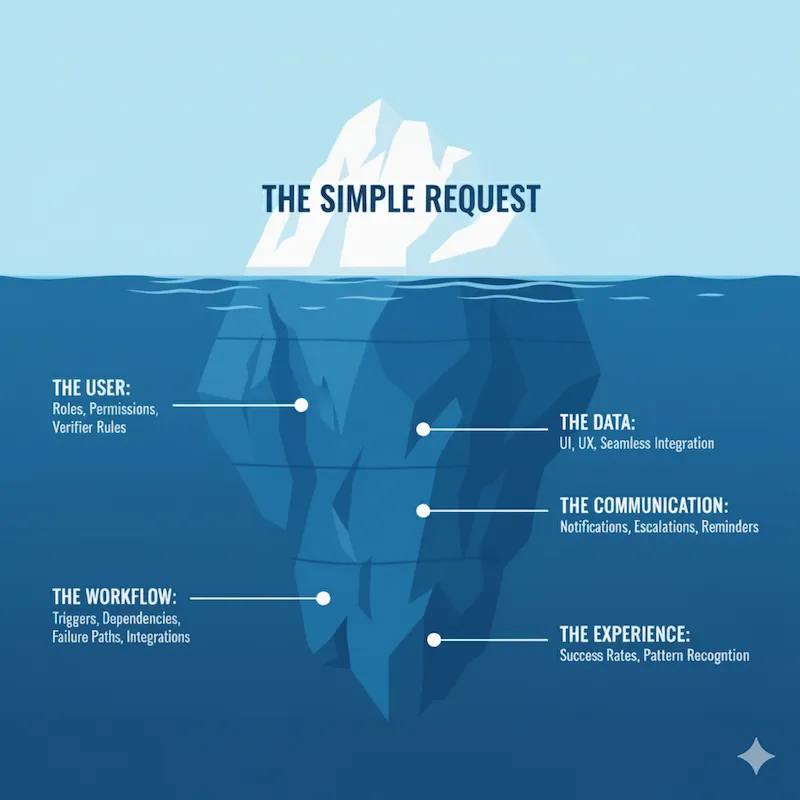
You’re a busy EHS leader, and you’ve just handled a near-miss incident. The team identifies a corrective action: install a new safety guard. To ensure it works, you want to add a simple effectiveness check to your process: assign the task, start a one-month verification period, and have someone close it out.
Simple, right?
You present this idea, and in return, you get a multi-page specification document. You’re left wondering, “Why can’t they just build what I asked for?”
This isn’t bureaucracy; it’s a necessary translation. You’re experiencing the difference between the visible tip of an iceberg and the massive, unseen part below the water. This is the Requirements Iceberg.
Your request is the tip—the small, visible part. Making that request work requires mapping the submerged mass: the data flows, role permissions, and system logic that the software team needs to build. This hidden structure is what ensures a corrective action effectiveness check is reliable, works across all your sites, and solves the problem you started with.
Here’s what’s hiding beneath the surface.
Contents
The User: Who Does What?
The first submerged layer translates operational roles into system permissions. Your request makes sense to a person, but a software system cannot assume anything. Start by explicitly defining who can do what, and why.
Who is “someone”?
The most dangerous assumption would be assigning the verification to the person who completed the original task. This creates a conflict of interest. An effective check requires an independent party to be credible. Therefore, the system must be configured to prevent an assignee from verifying their own work. This immediately raises the next question: who is the right verifier? A reliable system defines these assignment rules based on factors like organization hierarchy, the risk level of the action, or site-specific EHS roles. It must also handle transfers or leaves during the monitoring period, ensuring the task lands with an impartial person.
Who needs to know?
Beyond who does the work, define who sees it. Who needs to see the status of this check? The EHS leader, the department head, and the compliance lead each need different views. The system must give the right people visibility without cluttering the dashboards of those who do not act on it.
The Workflow: How Does It Actually Work?
A one-line feature request describes the “happy path”—the ideal scenario where every step succeeds on schedule. A reliable EHS software specification, however, must be built for the exceptions that happen during active operations so the control eliminates risk and prevents recurrence.
Your idea of a “one-month monitoring period” seems straightforward, but its implementation is full of branching paths and dependencies.
What’s the official trigger to start the monitoring period?
What officially starts the timer? Is it the moment the corrective action is marked “complete”? What if the completion date is changed? The effectiveness check workflow must be dynamically linked to the status of the parent action.
What essential information does the verifier need to see?
To perform a meaningful effectiveness check, the verifier needs context. An integrated system does not just assign them a task called “Verify Fix”. It provides a direct, clickable link to the entire history: the original incident report, the root cause analysis, and photos. Forcing a verifier to hunt for this information produces a low-quality, “check-the-box” verification.
How long does the control need to be monitored?
A fixed one-month monitoring period does not fit every EHS control. A procedural change, like updating a warning label, may only need a one-week check. However, a fix designed to change operator behavior or verify a control on equipment that runs periodically may need a 90-day or 6-month verification window. The duration must be configurable based on the type of check and the risk profile of the action. If it is inflexible, your team will use sticky notes or calendar reminders to manage the real deadline, meaning your system no longer reflects what is happening on site.
How will the verifier prove the fix was effective?
Proving the original problem is gone takes more than a free-text comment. The system must prompt for specific evidence and help the user gather it. For instance, to confirm the absence of incident data, the system can display a live query on the verification screen: “System Check: Confirmed zero new near-miss reports linked to ‘Hazard: unguarded machine’ have been logged in the past 30 days.” To link observation data, it can provide a button to “Link Supporting Observations,” attaching formal records. Finally, to capture qualitative feedback, it can connect to your Management of Change (MOC) process and pull in operator sign-offs confirming their training and acceptance of the new control.
What happens if the fix is not effective?
What happens if the problem still exists? The system needs a clear, auditable path. Does a failure trigger a new non-conformity, or does the original action reopen? (Reopening the original action overwrites the history of the first attempt.) If this logic is unclear, users will close the action anyway and send an email—hiding the fact that the risk is still present.
What other safety programs need to be updated with the result?
The result of the check must trigger actions in other safety programs, closing the loop on the process. If the fix is effective, the system should prompt the user to update the central Risk Register, Job Hazard Analysis (JHA), or relevant standard operating procedures to lock in the change. Conversely, if the fix fails, the system must flag a failed control and link to the MOC process or a new Root Cause Analysis (RCA), ensuring a follow-up investigation runs.
The Communication: Keeping Everyone Informed
Even a thorough workflow fails if people do not know what they need to do. A silent system leaves tasks unworked, making notifications the routing layer of your EHS platform.
Who needs to be kept in the loop, and when?
Upon initial assignment, the verifier needs an email and in-app notification stating what to do, the context, and the due date. Likewise, when the check is completed, status updates should go to the original creator to confirm the loop is closed.
What happens if the verifier forgets?
When a verification passes its due date, a reminder to the verifier’s manager is not enough on its own. The alert has to reach someone who can act on it and stay open until they record a decision. An Escalation Email Is Not an Escalation sets out the rules.
The Data: Measure Impact, Not Just Tasks
While notifications prompt action on individual tasks, the wider value comes from aggregating the results across sites. Your new verification step becomes a way for your team to see which controls hold up, unless the information sits in an unqueried field. Dashboards should not just show “open” or “closed” actions; that is task tracking, not risk management. The system should answer diagnostic questions: What is the Verification Success Rate? Which departments or sites implement controls that pass verification on the first check? Are there recurring failure patterns in corrective actions? Failing to structure these fields skews the dashboard and hides why some fixes stick while others fail.
The Experience: Making It Usable
The quality of the records collected and the completion rate of the workflow depend on the final submerged layer: form usability. A feature that requires too many steps will be bypassed. Completing the check should require as few screens and inputs as the evidence allows. Where do users go to see their assigned checks? The form for completing the check — the User Interface (UI) — needs to be clear at a glance, and the number of clicks required — the User Experience (UX) — should be kept low. For example, the notification email can contain a direct link that opens the exact verification record.
Standard Templates vs. Site Reality
An EHS platform may include a pre-built template for effectiveness checks that blocks self-verification or sends automated reminders out of the box. Even with a template, the Requirements Iceberg remains; the decisions simply move from custom development to software configuration.
A template is a standardized guess at how you work. Mapping the iceberg is how you run a gap analysis between that guess and your site reality. If your system locks the monitoring period to 30 days while a field trial for a new PPE type requires 90 days of shift-level data, the template becomes a constraint rather than a shortcut. You still need to specify your hierarchy and evidence requirements before enabling the workflow. The order to configure in, and the test with real records for each step, comes next.
From “Simple” to Successful
Once the full iceberg is visible, the one-line request is only the starting point. Writing a complete EHS software specification is not bureaucracy; it is how requirements scoping prevents scope creep and implementation pitfalls before configuration begins. Skipping this step is expensive: when a system lacks the rule that prevents assignees from verifying their own work, teams end up re-auditing hundreds of closed actions by hand because the verification records cannot pass a compliance audit.
Defining these requirements upfront ensures the workflow fits how your sites operate, captures defensible verification records, and shows whether corrective actions actually removed the hazard.
When you scope a change to your EHS system, start with the tip of the iceberg, then map the layers underneath: Who besides the assignee touches the record? What happens in the database when a control fails verification? Which fields will prove the control worked six months from now? While an AI assistant can draft a generic workflow outline in seconds, it does not know which exceptions occur across your facilities. For the complete set of scoping worksheets and configuration templates, see A Practical Guide to EHS Software Implementation.
Frequently Asked Questions
What is the Requirements Iceberg in EHS software?
The Requirements Iceberg is the gap between a short feature request (such as adding a 30-day effectiveness check to a corrective action) and the underlying EHS software specification required to make it work across sites: role permissions, trigger rules, configurable monitoring windows, evidence links, escalation paths, and failure handling.
Why should an EHS system block assignees from verifying their own corrective actions?
Allowing the person who closed a corrective action to verify its effectiveness creates a conflict of interest. The workflow configuration must enforce verifier independence by assigning the check to a separate role based on risk level, site hierarchy, or EHS authority, with fallback routing when the assigned verifier changes roles or takes leave.
Why do standard EHS software templates fail during site configuration?
A pre-built vendor template is a standardized guess at how a workflow runs. If a template locks the monitoring window to 30 days while a seasonal process or behavioral control requires 90 days of operating data, teams track the real deadline outside the platform in spreadsheets or calendar reminders.
How does requirements scoping prevent scope creep and implementation pitfalls?
Documenting role permissions, trigger conditions, failure paths, and cross-module links before software configuration exposes hidden workflow decisions early. Without upfront requirements scoping, those missing rules surface during user testing as scope creep, billable change orders, or unusable compliance records.